A detailed technical comparison of SPI and I2C for embedded projects: signalling, timing, addressing, clock modes, pull-ups, edge cases and when the choice actually matters.
14 January 20268 min read
SPI
I2C
Embedded
Notes
Protocols
SPI and I2C are the two serial protocols you will encounter in almost every embedded project. Both transfer data between a microcontroller and peripherals. They solve the same problem in fundamentally different ways and the choice between them has real consequences for speed, pin count, reliability and debugging complexity.
Most tutorials treat this as a simple trade-off: SPI is fast, I2C saves pins. That is true but incomplete. The details matter when a bus locks up at 3am, when two sensors share the same I2C address or when your SPI display stops responding because you chose the wrong clock polarity. This post covers both protocols in enough depth to make those problems understandable.
SPI: Serial Peripheral Interface
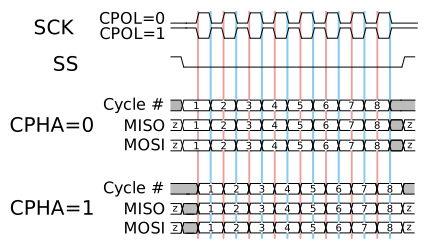
SPI timing diagram - MOSI and MISO transfer simultaneously on each clock edge. Source: Wikimedia Commons (CC BY-SA 3.0)
SPI was developed by Motorola in the 1980s and is now ubiquitous in embedded systems. It uses four signal lines: MOSI (master out, slave in), MISO (master in, slave out), SCLK (serial clock) and CS (chip select, active low, one per device). The master generates the clock and drives CS low to select a specific slave. Data is shifted out on MOSI and in on MISO simultaneously on every clock edge. This is full-duplex operation: both sides send and receive at the same time.
There is no addressing on the bus itself. The CS line is how you address devices. This keeps the protocol extremely simple but means each additional device requires one additional GPIO pin on the master. With five SPI devices you need five CS pins. Some designs use a daisy-chain topology to share CS but this complicates firmware and is rarely worth the effort.
SPI Clock Modes
SPI has four clock modes defined by two bits: CPOL (clock polarity) and CPHA (clock phase). CPOL determines the idle state of the clock: 0 means idle low, 1 means idle high. CPHA determines on which clock edge data is sampled: 0 means the leading edge, 1 means the trailing edge. The four combinations are modes 0 through 3.
Mode 0 (CPOL=0, CPHA=0): clock idle low, data sampled on rising edge - most common
Mode 1 (CPOL=0, CPHA=1): clock idle low, data sampled on falling edge
Mode 2 (CPOL=1, CPHA=0): clock idle high, data sampled on falling edge
Mode 3 (CPOL=1, CPHA=1): clock idle high, data sampled on rising edge
The mode must match between master and slave. If you configure SPI Mode 0 on your microcontroller and the peripheral expects Mode 3, the data will be garbage and the device will appear to not respond. Always check the peripheral's datasheet. The SD card spec, for example, requires Mode 0. The MAX7219 LED driver works in Mode 0. The BME280 environmental sensor works in both Mode 0 and Mode 3. Getting this wrong is one of the most common causes of SPI not working on a first attempt.
// ATmega644P SPI master initialisation - Mode 0, fosc/16
void spi_init(void) {
    // I set MOSI, SCK and SS as outputs; MISO is input by hardware
    DDRB |= (1 << PB5) | (1 << PB7) | (1 << PB4);
    // I enable SPI as master with fosc/16 clock (1.25 MHz at 20 MHz crystal)
    SPCR = (1 << SPE) | (1 << MSTR) | (1 << SPR0);
}

uint8_t spi_transfer(uint8_t data) {
    SPDR = data;
    // I wait for transmission complete flag
    while (!(SPSR & (1 << SPIF)));
    return SPDR;
}
I2C: Inter-Integrated Circuit
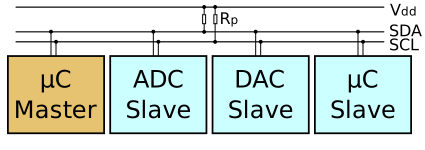
I2C bus topology - multiple devices share two wires with unique 7-bit addresses. Source: Wikimedia Commons (CC BY-SA 3.0)
I2C was designed by Philips Semiconductor (now NXP) in 1982 for connecting low-speed peripherals on a motherboard. It uses two open-drain signal lines: SDA (serial data) and SCL (serial clock). Open-drain means each device can pull the line low but cannot actively drive it high - the lines are pulled high by external resistors, typically 4.7 kΩ for standard mode or 2.2 kΩ for fast mode. This design allows multiple masters and multiple slaves on the same two wires.
Every transaction starts with a START condition (SDA pulled low while SCL is high), followed by a 7-bit device address and a read/write bit. The addressed slave responds with an ACK (pulling SDA low during the ninth clock pulse). Data bytes follow, each acknowledged by the receiver. A STOP condition (SDA released high while SCL is high) ends the transaction. This handshake overhead is why I2C is slower than SPI even at the same clock frequency.
I2C Address Conflicts
The 7-bit address space allows 128 addresses but 16 are reserved, leaving 112 usable. This is often enough, but address conflicts are a genuine problem. The MPU6050 IMU defaults to address 0x68 and can be moved to 0x69 by pulling its AD0 pin high. The BMP280 pressure sensor defaults to 0x76 or 0x77 depending on a pin. If you need two identical sensors on the same bus, you are limited to two instances at most unless the device supports address selection beyond a single pin.
When debugging I2C address conflicts, an I2C scanner is essential. The following snippet is standard practice on any new board bring-up:
// I2C scanner for ATmega: probes all 128 addresses and prints which respond
#include <util/twi.h>

void i2c_scan(void) {
    for (uint8_t addr = 1; addr < 128; addr++) {
        TWBR = 72;  // 100 kHz at 16 MHz
        TWCR = (1 << TWINT) | (1 << TWSTA) | (1 << TWEN);
        while (!(TWCR & (1 << TWINT)));
        if ((TWSR & 0xF8) != TW_START) continue;

        TWDR = (addr << 1) | TW_WRITE;
        TWCR = (1 << TWINT) | (1 << TWEN);
        while (!(TWCR & (1 << TWINT)));

        if ((TWSR & 0xF8) == TW_MT_SLA_ACK) {
            printf("Device at 0x%02X\r\n", addr);
        }
        TWCR = (1 << TWINT) | (1 << TWEN) | (1 << TWSTO);
    }
}
Clock Stretching and Bus Hangs
I2C slaves are permitted to hold SCL low to pause a transaction while they prepare data. This is called clock stretching. Most microcontroller I2C peripherals handle it automatically. The problem arises when a slave stretches the clock indefinitely - usually because a transaction was interrupted mid-way, leaving the slave in an indeterminate state. The bus hangs and neither master nor slave can reset it through normal means.
The standard recovery procedure is to manually toggle SCL nine times with SDA held high, then issue a STOP condition. This forces any stuck slave to release SDA. On microcontrollers without hardware support for this, you need to bit-bang the recovery sequence in software before reinitialising the I2C peripheral. This is a known issue with the STM32 HAL I2C driver and was a documented errata item on several STM32 families for years.
Pull-up Resistors
I2C requires pull-up resistors on both SDA and SCL. The correct value depends on bus capacitance and clock speed. The I2C specification defines the maximum rise time as 1000 ns for standard mode (100 kHz) and 300 ns for fast mode (400 kHz). Bus capacitance includes PCB trace capacitance, device pin capacitance and cable capacitance if applicable.
For a typical short PCB trace with two or three devices, 4.7 kΩ works reliably at 100 kHz. For fast mode or longer buses, reduce to 2.2 kΩ or 1 kΩ. Pull-ups that are too weak (too high resistance) cause slow rise times and unreliable ACKs. Pull-ups that are too strong (too low resistance) increase power consumption and can violate device input voltage specs. Most I2C development boards include 4.7 kΩ pull-ups on the bus lines, which is why breadboard I2C usually just works.
Comparison Table
SPI wires: 4 minimum (MOSI, MISO, SCLK, CS) plus one CS per additional device
I2C wires: 2 (SDA, SCL) regardless of device count
SPI speed: 1-50+ MHz depending on devices and layout
I2C addressing: via 7-bit address in protocol (software select)
SPI ACK: none - no confirmation of receipt
I2C ACK: every byte acknowledged by receiver
SPI use cases: displays, SD cards, high-speed ADCs, flash memory
I2C use cases: temperature sensors, IMUs, EEPROMs, RTCs, DACs
How to Choose
Use SPI when throughput matters. Streaming data from a display, logging to an SD card or reading a high-speed ADC all demand the bandwidth SPI provides. Use I2C when you have several low-bandwidth configuration or sensor devices and pin count is a constraint. A typical node in a Phaemos sensor board uses I2C for the BME280 environmental sensor and the DS3231 RTC (three devices, two wires total) and SPI for the W25Q flash memory (high-speed writes, full-duplex).
If a device is available in both, choose based on the application. Identical devices on the same bus favour SPI because you are not constrained by address space. High pin-count microcontrollers with many SPI peripherals available lean towards SPI for simplicity. Battery-powered systems sometimes prefer I2C because the open-drain bus can be powered down more cleanly.
The best protocol is the one that does not hang at 3am.


Comments
Have a thought, correction or question? Sign in with GitHub - I read every comment and reply where I can.